

If you manage paid acquisition for a growing brand or agency, creating Meta advertising campaigns by hand is one of the fastest ways to drain your week. Launching ten new creative variations or testing three audience angles means clicking through the exact same sequence in Meta Ads Manager over and over: selecting objectives, configuring pixel events, setting daily budgets, building audience targeting, uploading creatives, copying headlines, and pasting destination URLs. It is tedious, mechanical work that begs to be automated. But automating advertising campaigns blindly is dangerous. A small typo in your workflow can set a daily budget at $5,000 instead of $50, target the wrong country, create duplicate ad sets, or trigger an infinite retry loop that burns through your API rate limits.
The goal of a production-grade Meta Ads automation pipeline is not to replace the media buyer with an autonomous bot that spends money unchecked. The goal is to eliminate the repetitive setup work while keeping human judgment firmly in control.
In this technical guide, we will walk through how to build a reliable, safe Meta Ads automation workflow using n8n, the Meta Marketing API (v21.0), and AI strictly where it adds genuine value. We will cover the required object hierarchy, pre-flight data validation, idempotent state tracking, API error classification, and how to enforce human review before a single dollar is spent.
The Pipeline Architecture: Why the Order of Operations Matters
Meta’s advertising structure is strictly hierarchical. You cannot create an ad out of thin air; every object in the Marketing API depends on an object created one step earlier:
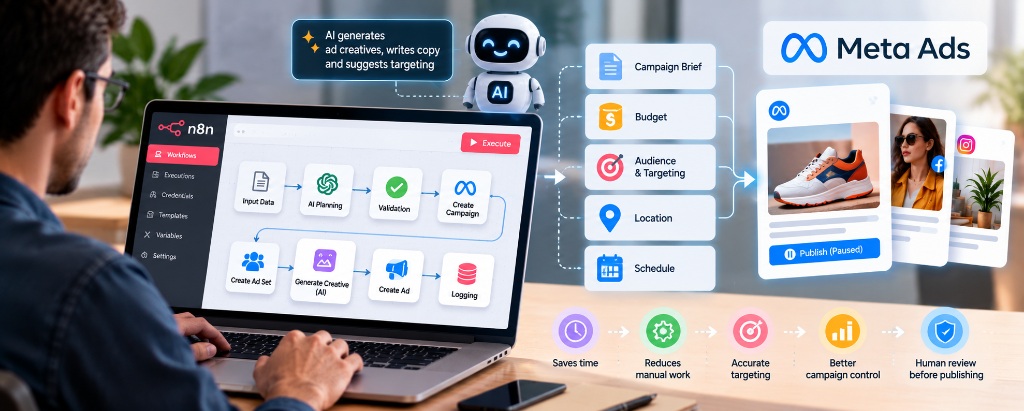
Because of this dependency chain, an automation workflow in n8n must follow a sequential, defensive pipeline:
- Campaign Ingestion: Receive a structured brief from a webhook, Airtable base, or internal form.
- AI Copy Generation: Use an LLM node to draft high-converting headline variations, primary text, and call-to-action hooks from the brief.
- Pre-Flight Validation: Run a JavaScript Code node to verify that all IDs, budget numbers, and URLs are valid before calling Meta.
- Campaign Creation: Call
POST /act_{id}/campaignswith status set toPAUSED. - Ad Set Creation: Call
POST /act_{id}/adsetslinked to the new Campaign ID. - Ad Creative Creation: Call
POST /act_{id}/adcreativesto assemble copy and media assets. - Ad Assembly: Call
POST /act_{id}/adslinking the Ad Set and Creative. - Human Review Gate: Post a notification to Slack or Discord with a direct link to Meta Ads Manager for human verification.
If any step fails along this chain, the workflow must halt immediately, log the exact error, and alert the team. It must never attempt to create an Ad if the Ad Set failed two seconds earlier.
Defining the Input: What the Workflow Needs to Know
Every automated run should start with a clean, structured payload. A common failure in ad automation is trying to make software guess missing parameters. In advertising, missing information should never be guessed; it should trigger an immediate validation error.
Here is a production-ready input schema entering the n8n webhook:
{
  "ad_account_id": "1234567890",
  "page_id": "9876543210",
  "campaign_name": "Q4 Growth - Wireless Earbuds Launch",
  "objective": "OUTCOME_SALES",
  "daily_budget_cents": 5000,
  "target_countries": ["US", "CA"],
  "age_min": 21,
  "age_max": 55,
  "destination_url": "https://example.com/earbuds?utm_source=meta&utm_medium=paid",
  "image_hash": "a1b2c3d4e5f6789012345678",
  "product_brief": "Noise-cancelling waterproof earbuds with 36-hour battery life. Target commuters and fitness runners."
}
Notice that the budget is explicitly defined in cents (5000 cents = $50.00). Meta's API handles currencies in their basic unit (cents for USD, EUR, etc.). Storing budgets as integers prevents floating-point rounding errors that can cause accidental over-spending.
Pre-Flight Validation: Catching Errors Before Calling Meta
The biggest mistake in marketing automation is sending unverified data directly to third-party APIs. If your destination URL is missing an https:// scheme or your budget is below Meta's minimum, the API will reject your request with an error code halfway through the sequence.
Instead, insert an n8n Code node immediately after input ingestion to run strict pre-flight checks:
// n8n Code Node: Pre-Flight Validation
const input = $input.first().json;
const errors = [];

// 1. Verify required IDs
if (!input.ad_account_id || !/^\d+$/.test(input.ad_account_id)) {
  errors.push("Invalid or missing ad_account_id");
}
if (!input.page_id) {
  errors.push("Missing Facebook Page ID");
}

// 2. Audit budget boundaries (e.g. min $5, max $500 for safety)
if (!input.daily_budget_cents || input.daily_budget_cents < 500 || input.daily_budget_cents > 50000) {
  errors.push(`Budget ${input.daily_budget_cents} cents is outside safe threshold ($5 - $500)`);
}

// 3. Validate Destination URL
try {
  const parsedUrl = new URL(input.destination_url);
  if (parsedUrl.protocol !== "https:") errors.push("Destination URL must use HTTPS");
} catch (e) {
  errors.push("Malformed destination_url");
}

if (errors.length > 0) {
  throw new Error(`Pre-Flight Validation Failed: ${errors.join("; ")}`);
}

return [{ json: { ...input, validated: true } }];
This hard stop costs nothing in execution time and completely eliminates malformed requests before touching Meta's servers.
Building the Meta Object Chain in n8n
Once the data passes validation, n8n executes the four sequential HTTP requests using the Meta Marketing API (v21.0). Each request uses Header Authentication with a System User Access Token possessing ads_management, ads_read, and pages_read_engagement permissions.
Step 1: Create the Campaign
The Campaign sets the overarching business objective and special ad categories. In n8n, configure an HTTP Request Node:
- Method: POST
- URL:
https://graph.facebook.com/v21.0/act_{{ $json.ad_account_id }}/campaigns - Body Parameters:
name:{{ $json.campaign_name }}objective:{{ $json.objective }}(e.g.OUTCOME_SALES)status:"PAUSED"(Non-negotiable safety setting)special_ad_categories:["NONE"]
Meta returns a response containing the new ID: { "id": "120210000000000001" }.
Step 2: Create the Ad Set
The Ad Set controls audience targeting, placement, schedule, and budget. Connect another HTTP Request node:
- Method: POST
- URL:
https://graph.facebook.com/v21.0/act_{{ $('Pre-Flight Validation').first().json.ad_account_id }}/adsets - Body Parameters:
name:{{ $json.campaign_name }} - Broad Audiencecampaign_id:{{ $('Create Campaign').item.json.id }}daily_budget:{{ $('Pre-Flight Validation').first().json.daily_budget_cents }}billing_event:"IMPRESSIONS"optimization_goal:"OFFSITE_CONVERSIONS"targeting:{ "geo_locations": { "countries": {{ $('Pre-Flight Validation').first().json.target_countries }} }, "age_min": {{ $('Pre-Flight Validation').first().json.age_min }}, "age_max": {{ $('Pre-Flight Validation').first().json.age_max }} }status:"PAUSED"
Step 3: Create the Ad Creative
The Ad Creative bundles the visual media, primary text, headline, and link data. This is where AI copy generation fits into the payload:
- Method: POST
- URL:
https://graph.facebook.com/v21.0/act_{{ $('Pre-Flight Validation').first().json.ad_account_id }}/adcreatives - Body Parameters:
name:{{ $json.campaign_name }} - Creative V1object_story_spec:{ "page_id": "{{ $('Pre-Flight Validation').first().json.page_id }}", "link_data": { "image_hash": "{{ $('Pre-Flight Validation').first().json.image_hash }}", "link": "{{ $('Pre-Flight Validation').first().json.destination_url }}", "message": "{{ $('AI Copy Generator').item.json.primary_text }}", "name": "{{ $('AI Copy Generator').item.json.headline }}", "call_to_action": { "type": "SHOP_NOW" } } }
Step 4: Create the Ad
The Ad object is simply the bridge that binds your Ad Set and your Ad Creative together:
- Method: POST
- URL:
https://graph.facebook.com/v21.0/act_{{ $('Pre-Flight Validation').first().json.ad_account_id }}/ads - Body Parameters:
name:{{ $json.campaign_name }} - Ad V1adset_id:{{ $('Create Ad Set').item.json.id }}creative:{ "creative_id": "{{ $('Create Creative').item.json.id }}" }status:"PAUSED"
The Non-Negotiable Rule: Status PAUSED by Default
Notice that every single object creation node in this workflow passes status: "PAUSED".
In advertising automation, this is your primary financial circuit breaker. Automation is superb at assembling complex trees of data, linking hashes, and verifying URLs. But software should never be granted unilateral authority to start spending real money without human sign-off.
By creating the campaign in a paused state, your media buying team can open Meta Ads Manager, inspect the ad preview on mobile and desktop feeds, verify that tracking pixels are responding, and manually click "Publish" or toggle the campaign to active. If a bug ever bypasses your validation checks, the worst-case outcome is a paused draft in Ads Manager, not a surprise $5,000 credit card bill.
Where AI Actually Helps (And Where It Shouldn't Touch)
Because this guide covers n8n and AI, it is tempting to sprinkle language model calls into every step of the workflow. That is a dangerous anti-pattern.
As we explored in our breakdown on automations that actually save time and ones that don't, brittle automations that try to replace human strategic decisions create more maintenance overhead than the manual tasks they were supposed to eliminate. High-leverage automation keeps deterministic tasks rigid and applies AI strictly where natural language processing provides genuine speed:
| Task Category | Recommended Tool | Why It Belongs Here |
|---|---|---|
| Budget Calculations & Currency | n8n Code Node (JavaScript) | Deterministic math. AI must never calculate ad spend or convert currencies. |
| Ad Copy & Angle Variations | LLM Node (Claude / OpenAI) | Takes raw product briefs and outputs structured JSON with three high-converting headlines and hooks. |
| API Calls & ID Passing | n8n HTTP Request Nodes | Strict REST requests. Guaranteed ordering and header token authentication. |
| Cryptic Error Translation | LLM Error Classifier | Translates obscure Meta subcodes (e.g. 1885260) into actionable plain-English Slack alerts. |
| Campaign Activation | Human Media Buyer | Final quality review in Ads Manager before spend begins. |
Production Error Handling: Retryable vs. Fatal Errors
A production workflow cannot simply use a generic "retry on failure" toggle. If Meta returns an error, repeating the exact same request without understanding why it failed will either lock your API access or spam your ad account.
Meta Marketing API errors return a structured JSON response:
{
  "error": {
    "message": "Invalid parameter",
    "type": "OAuthException",
    "code": 100,
    "error_subcode": 1885260,
    "is_transient": false,
    "error_user_title": "Ad Account Spending Limit",
    "fbtrace_id": "G9xK2LmPQ1a"
  }
}
Your n8n workflow must split failures into two distinct branches:
1. Retryable Errors (Transient Infrastructure Glitches)
If Meta returns is_transient: true, HTTP status 500 or 503, or API error codes 17 or 613 (rate limiting), the issue is temporary server load.
In n8n, configure exponential backoff: wait 5 seconds on retry one, 15 seconds on retry two, and 45 seconds on retry three. Set a hard limit of three retries. If the third retry fails, stop execution and alert the engineering team.
2. Fatal Non-Retryable Errors (Configuration & Permissions)
If Meta returns code 100 (invalid parameter), code 190 (invalid or expired access token), code 200 (permissions denied), or billing subcodes, retrying the request will never succeed. Retrying simply wastes execution time and risks account suspension.
For fatal errors, route execution immediately to an alert node. This is an ideal place to have an LLM node summarize the Meta error message and fbtrace_id into a clean Slack notification: "Ad Set creation failed for Account 1234567890: Daily budget ($3.00) is below Meta's minimum requirement for this country ($5.00). Please update the brief."
Preventing Duplicate Creation: The Idempotency Strategy
Consider what happens when your workflow successfully creates the Campaign and the Ad Set, but fails on Step 3 because of a malformed image hash.
If someone fixes the image hash in the input and hits "Execute Workflow" again naively, the pipeline will run from Step 1. It will create a second Campaign and a second Ad Set, leaving two duplicate campaigns sitting in Ads Manager.
To prevent duplicates, make your workflow state-aware:
How to Implement State Tracking in n8n:
- Record Created IDs Immediately: After Step 1 succeeds, write the
campaign_idback to your source record (Airtable row, PostgreSQL table, or n8n workflow static data). - Check Before Creating: At the start of Step 1, evaluate an
Ifnode:{{ $json.campaign_id ? true : false }}. If an ID already exists, skip the creation HTTP call and simply pass the existing ID downstream to Step 2. - Repeat for Every Object: Apply the same check for
adset_idandcreative_id. If the workflow dies halfway through, re-running it will smoothly pick up at the exact step that failed without duplicating upstream objects.
Closing the Loop: Logging and the Review Notification
When all four objects are created, the workflow should log the execution metadata and notify the media buying team.
Construct a clean Slack or Discord block notification using an n8n webhook or Slack node:
Campaign: Q4 Growth - Wireless Earbuds Launch (act_1234567890)
Ad Set: Broad Audience - $50.00 / day (US, CA)
Status: PAUSED BY DEFAULT
Review Link: Open in Meta Ads Manager ➔
With one click, the media buyer is taken directly to the campaign in Meta Ads Manager. They spend sixty seconds reviewing the placement, checking the creative preview on mobile feeds, and toggling the campaign to active.
The Bottom Line for Engineering Teams
Automating Meta Ads creation is not about building an unpredictable AI agent that runs wild with your ad account. It is about building a disciplined, assembly-line pipeline:
- Use deterministic Code nodes for validation, currency handling, and safety thresholds.
- Use AI models strictly to assist with drafting copy and parsing confusing error codes.
- Create every object with status PAUSED to prevent unverified ad spend.
- Store object IDs at each step to ensure safe, duplicate-free retries.
- Keep a human media buyer at the end of the line as the final quality gatekeeper.
When you build your advertising automation with these guardrails, you eliminate hours of repetitive clicking every week while sleeping soundly knowing your ad spend is completely protected.
Master Architecture: This marketing orchestration pipeline is featured as a core blueprint in our 2026 AI Workflow Automation Guide, detailing node-based orchestrations, webhook dispatching, and token cost economics.