
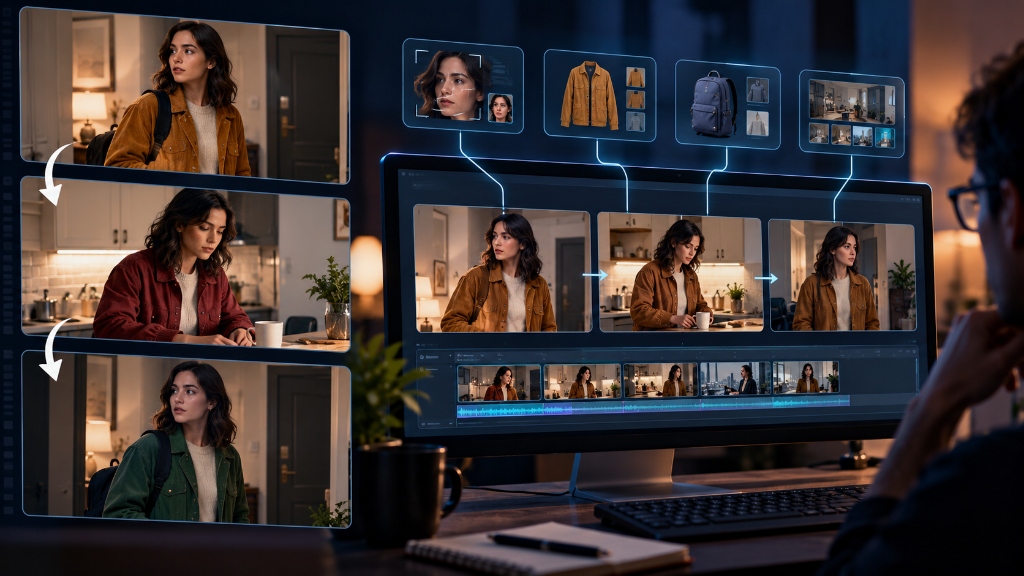
Making one good AI video clip is getting easier every month. You type a prompt, wait a short while, and get a five-second clip that looks remarkably crisp. The camera glides smoothly, the lighting looks cinematic, and the character on screen looks convincing. But the moment you try to connect that clip to a second or third shot, the whole thing falls apart. The character's face subtly shifts into someone else. Their jacket changes from corduroy to leather, or switches color entirely. A coffee cup sitting on a table in the first angle disappears in the close-up, and the layout of the room behind them changes completely.
Anyone who has tried to make something longer than a single social media clip has run into this wall. Video generators can make impressive isolated moments, but they have almost no memory. They do not know what happened five seconds ago, what someone was wearing, or where the furniture was placed.
On September 24, Google Research published a paper tackling this exact problem. Instead of asking one video model to handle the entire sequence by itself, the researchers built an orchestration system they call the AI Video Co-Director, paired with a visual memory bank named CANVAS. The project treats video consistency not as a prompting trick, but as an ongoing record-keeping job.
Why Video Models Forget What They Just Made
To understand why characters keep changing their clothes and faces, it helps to look at how modern video generators actually work.
When tools like Google Veo, OpenAI Sora, or Runway Gen-3 generate a clip, they work within a narrow window of time, usually four to eight seconds. Inside that short burst, the model does a surprisingly good job of keeping things steady. Each frame is compared against the frames immediately before and after it, which prevents a person from suddenly growing extra limbs or melting into the background as they take a step forward.
The trouble begins the moment you cut to the next shot.
In real filmmaking, cuts happen constantly. A director starts with a wide establishing shot of an actor walking into a room, cuts to a close-up of their face as they speak, and then cuts to an over-the-shoulder view of the person they are talking to.
When an AI video tool tries to make that second shot, it usually relies on one of two methods, and both have serious flaws:
Method 1: Writing a fresh text prompt for each shot
If you prompt the next shot by typing "the woman now sits down at the table," the computer starts from scratch. Natural language is too imprecise to carry over visual details. Words cannot describe the exact millimeter spacing between someone's cheekbones, the specific stitch pattern on their collar, or the exact shade of rust-red on their jacket. The computer fills in the missing details with new random guesses, which is why the character suddenly looks like a different actor in different clothes.
Method 2: Feeding the last frame into the next clip
Many creators try to get around this by taking the final frame of clip one and using it as the starting image for clip two. That works well enough if the camera is simply continuing to move forward in the same room. But it fails the moment you cut to another angle. If shot one ends on a person's face, the computer has no idea what their shoes look like or what is behind them. And if the character leaves a room and comes back three minutes later, that original room has been wiped from memory.
This explains why trying to solve continuity through better prompts almost never works. As we explored in our discussion on the case against prompt engineering, piling more adjectives into a text box is a brittle way to control software. You can spend twenty minutes describing someone's hair, coat buttons, and facial structure, but the generator will still interpret those words slightly differently on every single run.
The Script Supervisor on a Digital Set
The central idea in Google's research is that visual continuity cannot be solved by the video generator alone. Generating realistic motion is one job; keeping track of the story world is a completely different job.
On a traditional film set, there is a crew member called the script supervisor. Their entire job is to track continuity. They take photos of the actors between takes, note which hand held the coffee mug, write down whether a jacket was zipped or unzipped, and make sure that when the camera moves to a new angle, nothing has moved unexpectedly.
Google's research essentially builds an automated script supervisor on top of two existing foundation models: Gemini for reasoning and planning, and Veo for generating the actual video frames.
The research framework breaks the production process into four separate responsibilities:
- 1. Creative Planning (The Co-Director) This component plans out the scene structure, decides on camera angles, and figures out how the narrative should be broken down into individual shots. It will be presented at the COLM 2026 conference.
- 2. Persistent Visual Memory (CANVAS) This is the record-keeper. It stores visual anchors for each character's face, their clothing textures, key props, and the layout of the room. When a character or room returns later in the video, CANVAS retrieves those exact anchors so the generator does not have to guess. This work will be presented at EMNLP 2026.
- 3. Step-by-Step Generation (A²RD) Instead of generating the whole video at once, this system runs in a four-stage loop: retrieve the relevant visual anchors, generate the video segment, inspect the result, and update the memory bank with any new information.
- 4. Quality Review (VQQA) An automated reviewer that checks the rendered clip before accepting it. It inspects whether the face drifted or if an object disappeared. If the clip fails the check, the system triggers a refinement pass rather than letting the mistake ruin the rest of the sequence.
It is worth noting that the CANVAS memory system in this research paper has nothing to do with Google Canvas, the document writing and coding interface found in the consumer Gemini app. The research team simply used the same name for their visual memory architecture.
In practical terms, CANVAS works very much like visual retrieval-augmented generation. When we explained how retrieval-augmented generation works in text models, the core principle was simple: instead of forcing a language model to rely only on what it memorized during training, you connect it to an external database where it can look up factual documents before answering. CANVAS does the exact same thing for video, replacing text documents with visual records of characters, clothing, and props.
A Simple Three-Scene Test
To see the difference this makes, picture a simple three-scene sequence that any human director could shoot with a smartphone in fifteen minutes:
The Production Scenario:
- Scene 1 (The Hallway): Maya arrives home wearing an ochre corduroy jacket. She sets a blue canvas backpack down on a console table beside the front door and puts her keys in a dish.
- Scene 2 (The Kitchen): The camera cuts to the kitchen. Maya walks in, opens the refrigerator, and pours a glass of cold water.
- Scene 3 (Return to Hallway): Maya walks back into the hallway, picks up her blue backpack from the console table, and heads back out.
If you try generating this sequence with today's standard AI video tools, here is what typically happens:
Scene one looks great. But when you generate scene two in the kitchen, Maya's face drifts because the computer is working from a new prompt. Her jacket changes from ochre corduroy into a brown wool sweater.
When you move to scene three and ask for the hallway again, the generator has forgotten everything from scene one. The console table is now on the opposite wall, the front door has changed color, and the blue backpack has vanished entirely. To make that sequence watchable, a video editor has to spend hours in software like DaVinci Resolve or After Effects, manually replacing faces, painting out disappearing objects, and color-correcting mismatched clothes.
With a system like the Co-Director and CANVAS, the workflow changes:
When scene one renders, the memory system logs Maya's facial structure, the exact color and texture of her jacket, and the position of the blue backpack on the table. When the kitchen scene begins, the generator retrieves those character anchors so her face and clothing remain consistent in the new environment. When the camera returns to the hallway in scene three, the system pulls the original room layout from memory. The table is still by the door, the backpack is still sitting on it, and the automated reviewer verifies that the elements match before the clip is finalized.
Where Continuity Actually Matters
This kind of consistency is not just an aesthetic preference; it is the dividing line between an interesting experiment and a tool people can actually use in professional work.
Consider commercial advertising. If a brand wants to create a short product spot featuring a running shoe or an automobile, the product cannot subtly change its design between a wide shot of a runner on the street and a close-up of their foot hitting the pavement. Logos cannot shift position, and trim colors cannot change shades.
The same is true for cinematic storyboarding. Directors and concept artists often need to plan out complex scenes before spending hundreds of thousands of dollars on a physical shoot. Being able to generate an animatic where the characters look like the same people across twenty consecutive shots would save production teams weeks of manual sketching and 3D modeling.
Training materials and instructional videos face the same barrier. If a video demonstrates how to assemble a piece of machinery or perform a medical procedure, the tools, parts, and physical orientation must remain accurate from step one to step ten. A model that forgets where a wrench was placed two seconds ago is unusable for practical instruction.
The Realistic Constraints
While the research shows meaningful progress, it is important not to confuse a successful academic paper with a finished commercial tool. There are several significant hurdles between this research and everyday creative workflows:
1. It requires much more computing power
Generating an ordinary five-second AI video clip is already demanding on server hardware. In Google's framework, the system is not just running one video model. It runs Gemini to plan the scene, queries a visual memory database, generates the video with Veo, and then runs an evaluation model to inspect the output. If the evaluation model detects a continuity error, the clip gets generated again with adjusted parameters. That multi-step review loop produces much better results, but it multiplies the server time and cost required for every minute of footage.
2. A memory bank cannot fix bad physics
CANVAS tracks what things look like, but it does not change how the underlying video model handles physical movement. If the base model struggles to render liquid pouring smoothly or makes fingers merge together when someone picks up an object, state tracking will not fix that glitch. The memory system will ensure the character's jacket stays the right color, but the physical interaction with the physical world still depends entirely on the capabilities of the video generator itself.
3. It is not an available product yet
This work represents peer-reviewed research papers scheduled for conferences in 2026. Google has not released a public tool, an open-source codebase, or a setting inside YouTube Create. For now, independent creators and production houses still have to rely on traditional workarounds: training custom face models, stitching clips together with careful editing, and fixing continuity errors by hand in post-production.
The Bigger Picture
The first phase of generative AI video was all about raw visual appeal: proving that a computer could synthesize water ripples, photorealistic fur, and believable lighting in short bursts.
The next phase is about control and permanence. Real storytelling requires an internal reality that stays intact when the camera turns around or moves into the next room. Google's research demonstrates that solving continuity does not require an impossibly massive video model that remembers everything on its own. Instead, it requires treating video production the way human film crews have always treated it: by combining a camera with careful, deliberate record-keeping.
Master Architecture: Temporal consistency and identity latent anchors in generative media are examined in our 2026 AI Tools & Autonomous Agents Guide, tracking breakthroughs in commercial video synthesis.