
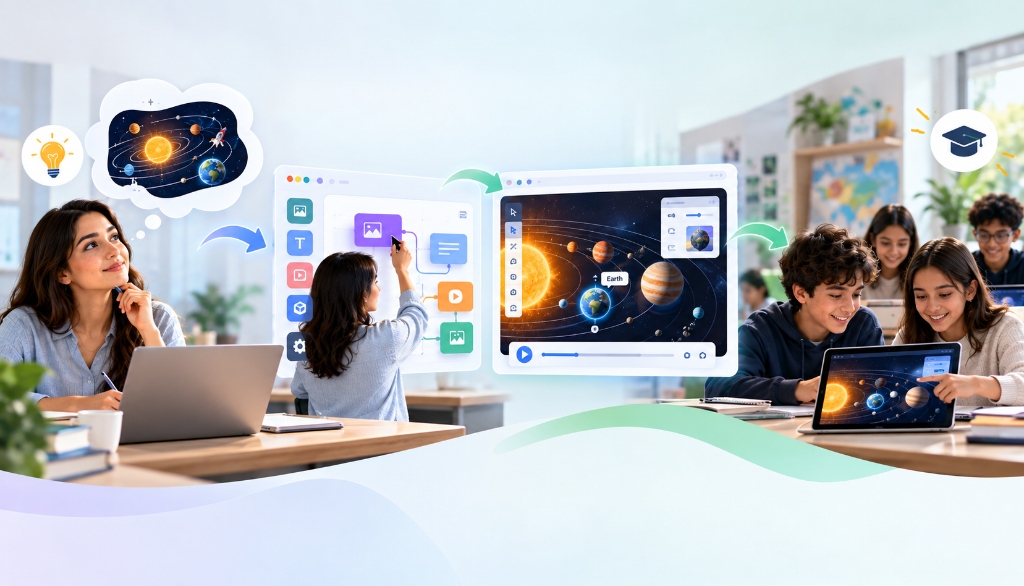
In a ninth-grade physics classroom, an educator is guiding thirty students through the counterintuitive mechanics of electrical circuits. Most students grasp the basic mathematics of Ohm’s Law on a whiteboard, but when they encounter real-world problems involving internal battery resistance, conceptual confusion sets in. The teacher knows exactly what would solve the problem: a five-minute interactive exercise where students can adjust the internal resistance slider of an aging chemical cell, watch the terminal voltage sag under varying loads, and witness the light bulb dim in real time.
Yet when that teacher searches existing digital education repositories, they hit a familiar wall. The standard simulations available online—while visually polished—are monolithic and rigid. One applet features an idealized battery with zero internal resistance; another includes complex multimeters and AC oscillating currents that introduce unnecessary cognitive distraction. Changing a single variable or stripping out extraneous UI controls requires cloning an open-source repository, modifying hundreds of lines of JavaScript and HTML5 Canvas code, and self-hosting the resulting application.
For decades, educational technology has suffered from this fundamental tension: teachers know precisely which cognitive friction or misconception their students need to resolve, but translating that pedagogical intent into interactive software has historically required professional software engineering skills.
On September 17, Google Research published a potential answer to this deadlock: an initiative exploring whether Generative UI (GenUI) and domain-specialized foundation models can allow educators to generate custom, curriculum-aligned learning interactives using simple natural language prompts—without writing a single line of code.
The Core Research Initiative
Google Research’s September 17 paper, "The future of practice: Enabling teachers to create learning interactives with generative UI," details how fine-tuned models from the LearnLM family can synthesize interactive STEM simulations. The initiative launched with a public library of over 30 teacher-reviewed interactives and an upcoming pilot program inside Google Workspace for Education to test on-demand custom simulation authoring.
The Adaptability Gap in Modern Educational Software
Educational research has long established that active learning—where students manipulate variables, test hypotheses, and observe outcomes—dramatically improves conceptual understanding compared to passive observation or lecture. Interactive digital simulations (such as those pioneered by the University of Colorado Boulder's PhET project) have become standard equipment in modern science and mathematics classrooms.
However, existing educational simulations suffer from what learning scientists describe as the adaptability gap. Because traditional educational applets require months of specialized software engineering, design, and testing, they are inherently built to target broad, standardized curricula. They are designed for the average state syllabus, not for the specific pedagogical nuance needed on a rainy Tuesday morning in Period 3.
When an educator finds that an existing simulation does not match their lesson plan, they are left with three unsatisfactory options:
- Force-fit the monolithic applet: The teacher spends fifteen minutes explaining which dials students should ignore, confusing students with extraneous options that have nothing to do with the day’s learning target.
- Prompt general-purpose LLMs for raw code: Many enterprising educators have experimented with asking standard chatbots (such as ChatGPT or Claude) to "generate an HTML/JavaScript simulation of a pendulum." While these models can output code, the results frequently fail to run, break across different browsers, lack accessible responsive touch controls, or worse, introduce subtle physics inaccuracies.
- Revert to static diagrams: Defeated by technical friction, the teacher abandons the interactive component entirely and hands out a static two-dimensional worksheet, forfeiting the exploratory inquiry that solidifies mental models.
Closing this gap requires a system that does not merely write raw scripts, but understands the specialized grammar of user interaction, pedagogical scaffolding, and domain-specific scientific logic.
What Is Generative UI (GenUI) in an Educational Context?
To understand Google Research’s approach, one must distinguish between traditional code generation and Generative UI (GenUI).
When a developer uses an AI assistant to write software, the model typically outputs unconstrained programming code—raw Python, JavaScript, or C++. In contrast, Generative UI operates at an abstraction layer higher: instead of generating arbitrary source code, the system synthesizes declarative interactive components based on an established design system and pedagogical runtime.
In Google Research’s framework, this is accomplished by leveraging LearnLM—a family of models fine-tuned specifically on educational psychology, pedagogy, and instructional design principles. Rather than hallucinating a user interface from scratch, the model interprets the teacher’s natural language prompt and produces a structured blueprint consisting of calibrated interactive primitives:
- Input Controllers: Dynamic sliders, step steppers, toggle switches, and draggable masses bounded by strict physical limits.
- Dynamic Canvases: Visual apparatuses such as balance scales, chemical reaction beakers, optic lenses, and electrical breadboards.
- Scaffolding Layers: Tiered hints that only reveal themselves after repeated student attempts, Socratic guiding questions, and self-checking validation triggers.
- Mathematical Solvers: Sandboxed execution rules that enforce real-world physical and mathematical laws without allowing the client interface to diverge into impossible states.
Instead of wrestling with syntax errors, the educator simply articulates the learning design: "Create an interactive exercise for 7th-grade chemistry on balancing combustion reactions. Give students sliders for molecule counts, show atomic breakdown diagrams that balance dynamically, and include a three-tiered hint system for balancing carbon, hydrogen, and oxygen sequentially."
The 4-Stage Architecture: From Curriculum Prompt to Classroom Sandbox
Transforming conversational instructional prompts into reliable classroom software requires a rigorous engineering pipeline. Google Research's workflow separates the creative intent from runtime execution through four interconnected stages:
Curriculum Objective Ingest & Specification
The teacher inputs their pedagogical goals, target student grade level, core learning objectives, and common student misconceptions. The system translates this unstructured prompt into a formal educational specification: identifying the independent variables, dependent variables, visual metaphors, and success criteria.
LearnLM GenUI Component Synthesis
The fine-tuned LearnLM model generates the declarative JSON schema representing the interactive application. It defines state variables, ties interactive UI widgets (sliders, drags, buttons) to scientific equations, formats dynamic visual assets, and writes multi-tier progressive hints designed to guide struggling students without immediately giving away the answer.
Automated Verification & Solvability Proving
Before the interactive is presented to an educator or student, it enters an automated testing harness. Automated headless agents interact with the simulation across edge-case parameters, verifying that the mathematical equations do not produce division-by-zero errors, that physical bounds (like negative resistance or impossible angles) cannot occur, and that all puzzle states are demonstrably solvable.
Educator Audit & Sandboxed Classroom Deployment
The teacher tests the generated simulation in an interactive review console, tweaking ranges, modifying hint phrasing, and signing off on conceptual accuracy. Once approved, the simulation is deployed directly into an isolated, privacy-compliant classroom sandbox (integrated into Google Classroom or web environments) where students can safely explore without tracking or script execution vulnerabilities.
Comparing Simulation Approaches: Monoliths vs. LLM Code vs. GenUI
To evaluate how Generative UI changes educational authoring, it helps to compare it against the two existing paradigms: hand-coded static applets and unconstrained generative coding.
| Dimension | Pre-Built Applets (PhET, etc.) | Raw LLM Code (ChatGPT/Claude) | Specialized GenUI (LearnLM) |
|---|---|---|---|
| Authoring Time | Instant (pre-existing) | 10–30 mins (prompting, debugging) | 60–120 seconds |
| Customizability | Very Low (rigid parameters) | High (unconstrained text) | High (lesson-specific tailoring) |
| Coding Required | None (unless forking source) | High (fixing broken HTML/JS) | Zero (natural language prompt) |
| Scientific Reliability | Extremely High (peer reviewed) | Unreliable (hallucinates equations) | High (automated solvers + audit) |
| Classroom Safety | High (standalone web applets) | Low (arbitrary client-side script) | High (sandboxed declarative runtime) |
| Pedagogical Scaffolding | Fixed or absent | Generic or prone to spoiling | Native tiered hint hierarchies |
As the comparison shows, the advantage of specialized educational GenUI is not simply speed; it is the establishment of guardrails. By constraining the AI to declare interactive components within a verified educational framework, the system eliminates the syntax crashes and deployment hazards that make raw LLM-generated code unusable for non-technical teachers.
Current Readiness: Public Library vs. Custom Generation Pilot
When evaluating emerging educational technology, distinguishing between what is publicly available today and what remains in controlled testing is critical. Google Research has taken a bifurcated, cautious approach to deployment:
1. The Public Interactive Library (Available Now)
The public-facing component of the initiative features a curated catalog of over 30 interactive learning exercises spanning core STEM topics:
- Physics: Light refraction through multiple media, simple harmonic motion in damped springs, and circuit resistance under temperature changes.
- Chemistry: Visual stoichiometry balancing, phase transitions under variable atmospheric pressure, and atomic electron configuration shells.
- Mathematics: Balance-scale linear algebra puzzles, geometric transformations on coordinate planes, and interactive fraction visualizations.
- Biology: Mendelian genetics crosses with Punnett square simulators and predator-prey population dynamics.
Crucially, every interactive simulation in this public repository was vetted, calibrated, and stress-tested by experienced classroom teachers prior to release. Educators can embed these directly into their curriculum today with high confidence in their scientific fidelity.
2. Custom Simulation Generation (The School Pilot)
The ability for an individual teacher to type an arbitrary lesson prompt and instantly receive a bespoke simulation is not yet universally available to the public. Instead, Google is launching a controlled pilot program across selected partner schools integrated within Google Workspace for Education.
This staged rollout reflects sound engineering discipline. Generating interactive software that directly influences a child's understanding of foundational scientific concepts carries far higher stakes than generating marketing copy or drafting emails. By restricting on-demand generation to a monitored pilot, researchers can study how teachers prompt the system, identify where automated validation catches errors, and observe how students interact with dynamically created widgets.
The Non-Negotiable Guardrail: Why Teacher Review Remains Essential
The most dangerous failure mode in educational AI is not a simulation that crashes; it is a simulation that runs smoothly while teaching incorrect science.
In software engineering, this is known as a logical bug. In educational theory, it is called a synthetic misconception. If an unconstrained AI model generates an interactive planetary orbit simulation where gravitational attraction scales linearly ($r$) rather than by the inverse-square law ($r^2$), the animation may look beautiful, but students will absorb an incorrect physical intuition that will actively handicap their scientific comprehension for years.
Similarly, in chemical reactions, foundation models without domain grounding frequently generate balanced stoichiometric ratios that violate conservation of mass or depict impossible oxidation states. Just as enterprise applications require contextual grounding through retrieval-augmented generation to prevent textual hallucinations, educational interactives require formal constraint checking against verified physical models.
The Danger of the "Silent Error"
Automated solvability harnesses can verify that an interactive circuit simulation does not crash and that the user can click through to the final screen. But automated algorithms cannot easily detect whether the pedagogical pacing is too steep, whether a visual metaphor causes cognitive confusion, or whether the simulation accidentally confirms a known student misconception. Teacher review is not an optional final polish; it is the load-bearing safety boundary of the entire system.
Before any simulation generated via the upcoming pilot enters a classroom, the workflow mandates that the teacher interact with every control, test boundary conditions, inspect the hint sequence, and verify that the learning outcome matches their lesson plan. As we explored when analyzing determining which workflows are truly worth automating, automation is most effective when it eliminates administrative and drafting friction, not when it attempts to replace professional human judgment.
The Great EdTech Fallacy: Interactive Novelty vs. Empirical Learning Gains
Whenever a new interactive technology arrives in education, it is easy to conflate student engagement with actual learning.
A classroom of students furiously moving sliders, toggling colorful switches, and watching on-screen animations certainly looks engaged. But educational psychologists have repeatedly demonstrated that visual interactivity does not automatically translate into deep conceptual mastery. Under certain conditions, poorly designed interactives actually depress learning through the split-attention effect and excessive cognitive load: students spend so much working memory navigating the visual interface that they fail to process the underlying scientific principle.
Google Research’s publication explicitly notes this limitation: while teacher feedback on the flexibility of GenUI interactives has been enthusiastic, empirical classroom studies measuring standardized learning gains remain an ongoing area of investigation.
For school leaders and instructional coaches, this distinction requires disciplined implementation:
- Interactivity must serve inquiry, not entertainment: A simulation should isolate one or two core variables. Adding decorative animations, excessive audio cues, or gamified badges often detracts from conceptual focus.
- Simulations need structured inquiry frameworks: Simply giving students an interactive widget without an accompanying hypothesis-driven worksheet or teacher-led guiding questions rarely produces durable learning. Students must make a prediction, test it in the simulation, observe the discrepancy, and articulate the explanation.
- Supervised experimentation over autonomous deployment: Just as observed in wider automation studies exploring what happens when autonomous systems execute tasks without continuous human calibration, placing unvetted generative tools directly into student hands risks cognitive drift and disengagement.
How Educators Can Prepare for Generative Educational Tools
As generative UI tools transition from research laboratories into mainstream classroom management platforms, educators and curriculum coordinators can adopt several practical habits to prepare for their arrival:
- Formulate the "Single Conceptual Pivot": The most effective simulations target a single, well-defined conceptual hurdle rather than trying to explain an entire textbook chapter. Before prompting any generative tool, identify the exact relationship students struggle with (e.g., "how changing surface area affects chemical reaction rate while holding concentration constant").
- Conduct Deliberate Edge-Case Testing: When reviewing an AI-generated simulation, push all sliders to their absolute minimum and maximum values. Check what happens at zero, at infinity, or under negative values. Does the simulation handle boundary conditions gracefully, or does it display nonsensical physical states?
- Scrutinize the Hint Hierarchy: Ensure that the AI has generated progressive, Socratic scaffolding rather than giving away the answer on the second click. The first hint should restate the principle; the second should suggest an action; only the final hint should provide explicit guidance.
- Integrate Formative Reflection: Conclude every interactive session with a synthesis question that requires students to apply the rule learned in the simulation to an unfamiliar real-world scenario.
The Future of Practice: Teachers as Software Architects
The ultimate promise of Google Research’s GenUI initiative is not the replacement of teachers by algorithms; it is the elevation of teachers from passive consumers of rigid commercial software into active architects of their own instructional tools.
For the past thirty years, educational software development was centralized in commercial publishing houses and specialized academic software labs. If a physics teacher in Ohio or a biology instructor in Singapore needed a tailored interactive exercise for their classroom, their only recourse was to wait for someone else to build it.
Generative UI dismantles that barrier. By combining natural language understanding, domain-specific pedagogical foundation models, and automated solvability verifications, it gives educators the power to create responsive, bespoke learning apparatuses on demand.
Yet the technology is only as good as the pedagogical wisdom guiding it. An AI model can generate code in milliseconds, but it cannot observe the look of confusion on a student’s face, diagnose the subtle conceptual leap they are struggling to make, or design the precise question that unlocks their understanding. When combined with rigorous teacher review and structured classroom inquiry, code-free simulation authoring will not just save time—it will give teachers the exact tools their students need to discover how the world works.
Master Architecture: Specialized educational tool stacks and no-code interactive simulation environments are indexed in our 2026 AI Tools & Autonomous Agents Guide, highlighting domain-specific agentic tools.